



Blog


How to Post Listings on DORZ: Sell or Rent Without Agents

In today’s digital world, selling or renting your property shouldn’t feel like a complicated process filled with agent commissions and middlemen. DORZ is here to simplify that experience — empowering residents to take control of their own listings and connect directly with buyers, renters, and the local community.
Whether you want to rent out your apartment, sell your car, or even list furniture, DORZ makes it quick, easy, and free. In this complete step-by-step guide, we’ll walk you through how to post your listings, reach real people, and manage your ads efficiently — all without agents or hidden costs.
What is DORZ?
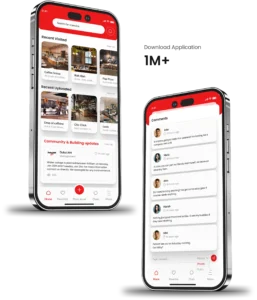
DORZ is a growing online platform designed for UAE residents and local businesses to connect, share, and trade effortlessly. It allows individuals to:
-
List their property for rent or sale
-
Post items for sale (furniture, vehicles, electronics, etc.)
-
Discover local recommendations and community services
Unlike traditional classified websites, DORZ is built around community connection — focusing on verified listings, real users, and zero commissions.
If you’re new to the platform, visit the Residents section to see how DORZ helps everyday people manage property listings, services, and local discoveries within one space.
Why Choose DORZ to Sell or Rent Without Agents
Traditional real estate agents often charge high commissions, add delays, and complicate what should be a simple transaction. DORZ removes all that hassle by giving you complete control of your listing.
Here’s why residents and property owners in the UAE are choosing DORZ:
1. No Agents, No Commissions
You don’t have to rely on intermediaries. Every conversation, inquiry, and deal happens directly between you and the buyer/renter — saving you thousands in agent fees.
2. Simple and Transparent
Posting on DORZ is easy for everyone — no technical skills needed. You can create a verified listing in just a few clicks and manage it from your account dashboard.
3. All-in-One Platform
From properties to personal items, DORZ supports every kind of listing. You can even use it for community-based listings, such as recommending restaurants or sharing local services through Discover the Power of Community.
4. Built for the Community
DORZ is not just a property site — it’s a neighbourhood ecosystem. You can engage, recommend, sell, rent, and connect with real people around you.
Learn more about DORZ’s communication and community-driven features on Community Communication Made Easy.
Step-by-Step Guide: How to Post a Listing on DORZ
Let’s dive into the process of creating your first listing — whether it’s a property, an item, or a service.

Step 1: Create a DORZ Account
Visit DORZ.online and sign up as a resident. You can use your email or phone number for quick registration.
Once your account is verified, you’ll gain access to your dashboard where you can manage multiple listings — all from one place.
If you run a business or want to promote services professionally, check out DORZ for Businesses — it offers tailored tools for local entrepreneurs, cafes, and service providers.
Step 2: Choose What You Want to List
After logging in, click “Post a Listing.”
You’ll be asked to select a category — for example:
-
Property (for rent/sale)
-
Cars
-
Furniture
-
Electronics
-
Fashion
-
Services
DORZ gives you flexibility to list almost anything that’s allowed under their community policy.
Step 3: Add Detailed Information
This is where you make your listing stand out. Include all the details buyers or renters would look for:
-
Title: Example – “Fully Furnished 2BHK Apartment for Rent in Dubai Marina”
-
Description: Add details about size, price, amenities, nearby landmarks, and contract type.
-
Photos: Upload 5–10 high-quality images with natural lighting.
-
Price: Set a competitive, market-reasonable price.
-
Location: Use the interactive map or type your area manually.
Pro Tip: Add specific keywords like “near metro,” “family-friendly,” or “pet-friendly” — these help your listing appear in more searches.

Step 4: Preview and Publish Your Listing
Once your listing is complete, click Preview to check details and photos.
After reviewing, click Submit — your listing will go through a quick verification process before going live.
Step 5: Manage Your Listings
From your dashboard, you can:
-
Edit or update existing listings
-
Renew expired listings
-
Respond to inquiries
-
Delete or mark items as sold/rented
Every message or inquiry is directly sent to your DORZ inbox — ensuring privacy and instant communication.
What You Can List on DORZ
DORZ is more than a property portal — it’s an all-in-one marketplace where residents can list almost anything within their community.
1. Property Listings
-
Apartments, villas, townhouses, studios
-
Short-term and long-term rentals
-
Properties for sale (direct owner listings)
No need to hire agents or pay commissions — your listing connects you directly with interested tenants or buyers.
2. Household Items
If you’re relocating, downsizing, or just decluttering, DORZ lets you sell items like:
-
Furniture
-
Electronics
-
Kitchen appliances
-
Decor & art pieces
3. Cars and Vehicles
Post your car for sale directly — include details like model, mileage, and condition.
DORZ’s user-friendly search filters make it easy for buyers to find your listing fast.
4. Community Listings
List local events, services, or experiences for your neighbourhood.
You can even share recommendations and reviews for restaurants and cafes through Discover the Power of Community.
Restaurants and cafés can also benefit — see why they’re joining the platform on Why Restaurants and Coffee Shops Are Joining DORZ.
Safety Tips for Selling or Renting Online
DORZ prioritizes your safety and transparency — but you should always follow best practices:
-
Communicate within DORZ’s platform — never share personal financial details externally.
-
Avoid upfront payments from unknown users.
-
Meet in safe, public locations.
-
Report suspicious users directly through your dashboard.
-
Double-check buyer/renter profiles before finalizing.
By following these precautions, you can enjoy a secure, agent-free transaction experience.
How to Make Your Listing Stand Out
With thousands of listings online, a few simple optimizations can help yours shine.
1. Use Clear Photos
Natural daylight, wide angles, and tidy surroundings make your listing more attractive.
2. Write a Compelling Title
Instead of “Apartment in Dubai”, write “Modern 2BHK Apartment in Downtown Dubai – No Agents”.
3. Be Descriptive Yet Concise
Highlight the benefits: proximity to metro, free parking, pet policy, furnished/unfurnished status.
4. Update Regularly
Renew your listing every 15 days — DORZ prioritizes fresh content in searches.
5. Share on Social Media
Share your DORZ listing link on WhatsApp or Facebook to drive direct inquiries.
DORZ for Businesses: Expand Your Reach Beyond Listings
If you run a café, gym, or retail outlet, you can also list your business for free using DORZ for Businesses.
Business listings help increase visibility within local communities — and best of all, there’s zero commission.
Learn more about why local eateries are using it for exposure here:
👉 Why Restaurants and Coffee Shops Are Joining DORZ – Zero Commission, Zero Risk
Or see how food delivery works smarter with DORZ’s network:
👉 Why Ordering Food on DORZ Is the Smartest Choice
💬 Community & Communication: The Heart of DORZ
Unlike other property or classified websites, DORZ emphasizes local connection. It’s more than just buying and selling — it’s about belonging to a community.
Check out:
-
Community Communication Made Easy with DORZ — learn how DORZ connects neighbours and supports community-driven growth.
-
Discover the Power of Community — where users share trusted recommendations for living, eating, and exploring Dubai.
Frequently Asked Questions (FAQs)
1. Is posting on DORZ free?
Yes, creating an account and posting listings is completely free for residents.
2. How long does my listing stay active?
Most listings stay active for 30 days and can be renewed manually.
3. Can I post multiple listings?
Absolutely — you can manage multiple active listings from one account.
4. Do I need to verify my account?
Yes, for security reasons DORZ verifies users via email or mobile number before listings go live.
5. Can businesses list their services?
Yes, through DORZ for Businesses, you can post cafés, salons, gyms, and more to attract nearby customers.
Conclusion
Selling or renting without agents has never been easier — thanks to DORZ’s user-friendly design, zero-commission model, and community-driven platform.
From properties and vehicles to household items and services, DORZ gives you the power to post, manage, and connect directly with real users — safely and confidently.
So, why wait?
Visit DORZ.online today and start posting your listings. Whether you’re a resident, a local business, or a new expat in Dubai, DORZ helps you sell, rent, and connect — all within your community.
Popular Post


Community Communication Made Easy with DORZ


Optimizing Security & Access Control Through Community Apps

Tips to Enable Effective Customer Service Through the DORZ App

Using DORZ for Community-Based Marketing: Reach Neighbors First


The Problem DORZ Solves


The Truth About Facebook, WhatsApp & Telegram Groups


Why Hyperlocal Marketing Is a Game-Changer for Your Business


Join DORZ: The New Era of Direct Property Discovery in Dubai

DORZ Is Always There If You Have an Emergency


Resident in Dubai? Post Anything for Free in Dubai with Dorz

Why Every Business in Dubai Must Join Dorz to Get Discovered Faster

Find the Right Tutor for Yourself or Your Kids on Dorz

Moving Communities? Don’t Lose Your Connections – Join Dorz

Sell & Rent Property in Dubai for Free

Carpool App for Parents in Dubai: Make School Runs Easy with DORZ

DORZ – The Best Marketplace to Sell Anything for Free in Your Community


Swap, Share, and Discover: The Exchange Category on Dorz

How to Use DORZ to Meet Your Neighbors Safely


Why DORZ? What is DORZ? Whom is DORZ for?

We created DORZ to make things easier for everyone.

How You Can Use DORZ as a Tutor in Your Community

How Local Businesses Can Boost Sales Using DORZ

Hey, hey! Here’s a pickle!


Top 5 Hidden Gems in Your Building or Community

We are loooosing human connection.

Tutors in Dubai Can Now Post Their Services on Dorz for Free

Using DORZ for Tenant Communication: Best Practices
10 Tips to Enable Effective Customer Service Through the DORZ App

